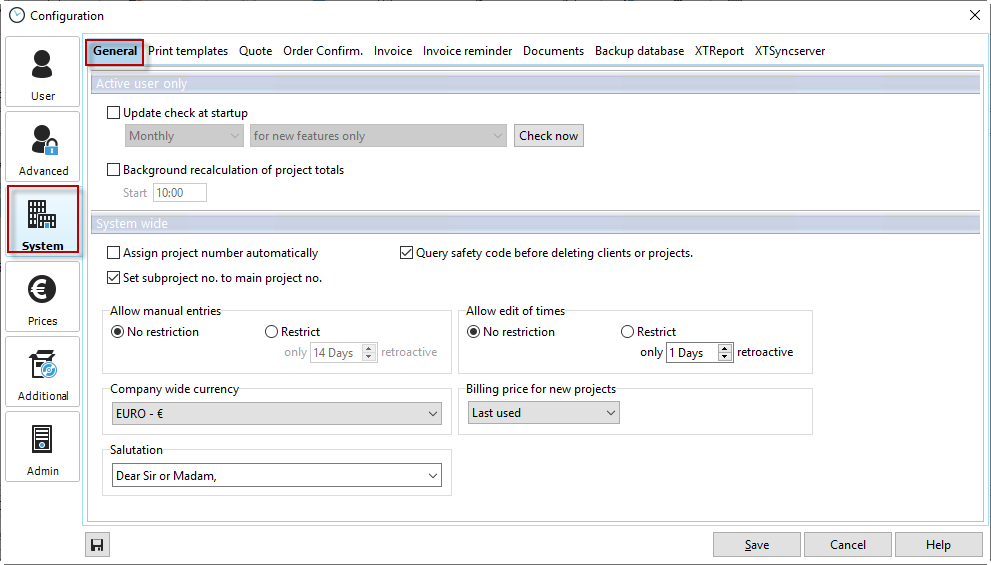
Update check at startup |
Stay up to date with Xpert-Timer and select the automatic update check when starting the program and the desired check interval. Once a month should be sufficient. You can check for the following updates: Functionality enhancements: These are new features in Xpert-Timer, not bug fixes. for bug fixes and feature enhancements: You will receive an update notification when we have fixed bugs or added new features to the program. Beta versions: If you are interested in beta versions, you can check here to see if new beta versions are available. Please note that beta versions should not be used in a live system, as we cannot guarantee the stability of the software. |
Background recalculation of project times |
Due to unforeseeable circumstances, it may happen that the final total for a project does not match the sum of the time stamps. With automatic background recalculation, the totals are recalculated daily at a fixed time of your choosing. This option should only be set by a single employee in the company and is only executed if that employee's Xpert Timer is also running at that time. |
Automatic project number assignment |
Xpert-Timer can assign numerical project numbers automatically. However, this only works if numerical numbers have been assigned from the beginning. |
Request security code before deleting customers and projects |
To prevent a project from being deleted accidentally, you can also request a security code before deletion. The employee must then manually enter the specified number to actually delete the project or customer.  |
Allow supplements |
You can restrict employees to only entering supplements retroactively for up to a certain number of days. If this period is exceeded, the supplement option for the timestamp is blocked. |
Allow changes to times |
Specify whether employees are allowed to change times or restrict how many days this can be done retroactively. |
Internal company currency |
This is the currency used to calculate internal costs. |
Billing rate for new projects |
Select the billing rate for new projects, e.g., your own billing rate, last used billing rate, from main project, from employee, or from price list. |
Display error log file
|
In the event of a program crash, the error log file may contain helpful information for reproducing errors. |
Database consistency check |
Due to unforeseeable circumstances, some records in the database may contain duplicate or invalid values. The consistency check finds and removes these records. |
Synchronize project times |
The project manager does not always update the overall view automatically. In the event of system crashes, for example, it may happen that recorded times do not appear in the total. Before you create reports from the project list in the project manager, we recommend that you synchronize the project times once. |